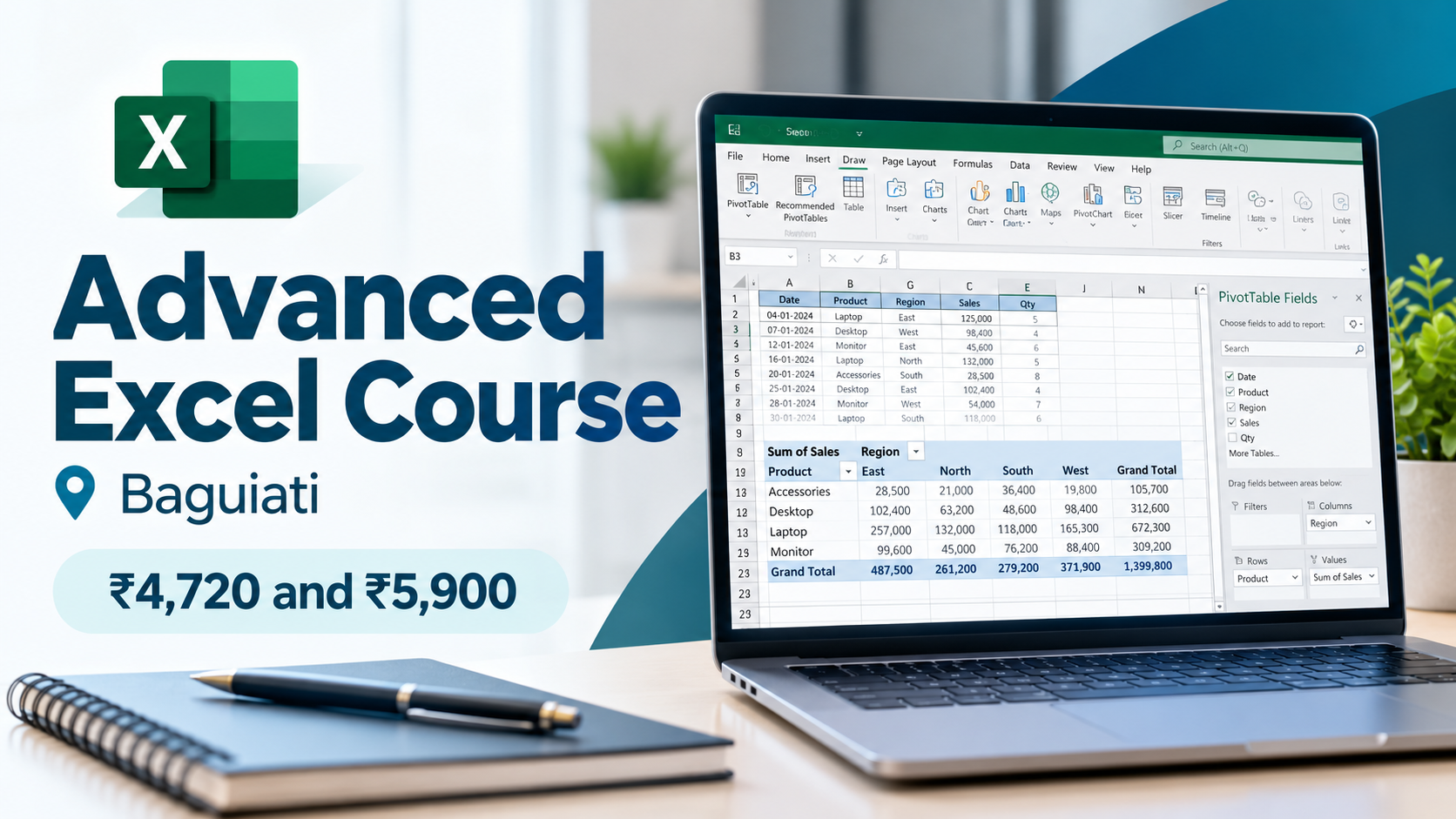
The advanced Excel course in Baguiati at Shashank Skills Academy has two fee tracks. The advanced track costs ₹4,720 for 18 classes and suits people who already know basic Excel. The A to Z track costs ₹5,900 for 30 classes and starts from the Excel screen, so complete beginners take this one. Both run at our centre on VIP Road and online, three days a week, two hours a class.
Fee pages usually stop at the number. A number does not say whether 18 classes are enough, what the extra ₹1,180 buys, or which track a first-year B.Com student and an office accountant should each pick. This post covers the syllabus class by class, the cost per hour, the batch timings, and what the course leaves out.
Written by the Shashank Skills Academy Editorial Team. Last updated 29 October 2026, when we checked the fees and batch details below against our current course information. Fees change from time to time, so confirm the current fee before you enrol.
Pick the ₹4,720 advanced track if you already use formulas, sorting and basic charts without help. Pick the ₹5,900 A to Z track if you are starting from zero: it adds 12 classes (nine basics, advanced VBA macros, practice papers and a closing quiz) for ₹1,180 more. Both tracks end with a certificate issued jointly by Shashank Skills Academy and Tally Institute of Learning.
What the ₹4,720 and ₹5,900 fees pay for
Both tracks of the advanced Excel course in Baguiati run two hours a class, three days a week. They differ in where you start and how many classes you get.
| Advanced track | A to Z track | |
|---|---|---|
| Fee | ₹4,720 | ₹5,900 |
| Classes | 18 | 30 |
| Total class hours | 36 | 60 |
| Duration at 3 classes a week | 6 weeks | 10 weeks |
| Cost per class | about ₹262 | about ₹197 |
| Cost per hour | about ₹131 | about ₹98 |
| Where you start | You already know basic Excel | No Excel knowledge needed |
| Certificate | Joint certificate from Shashank Skills Academy and Tally Institute of Learning | Same joint certificate |
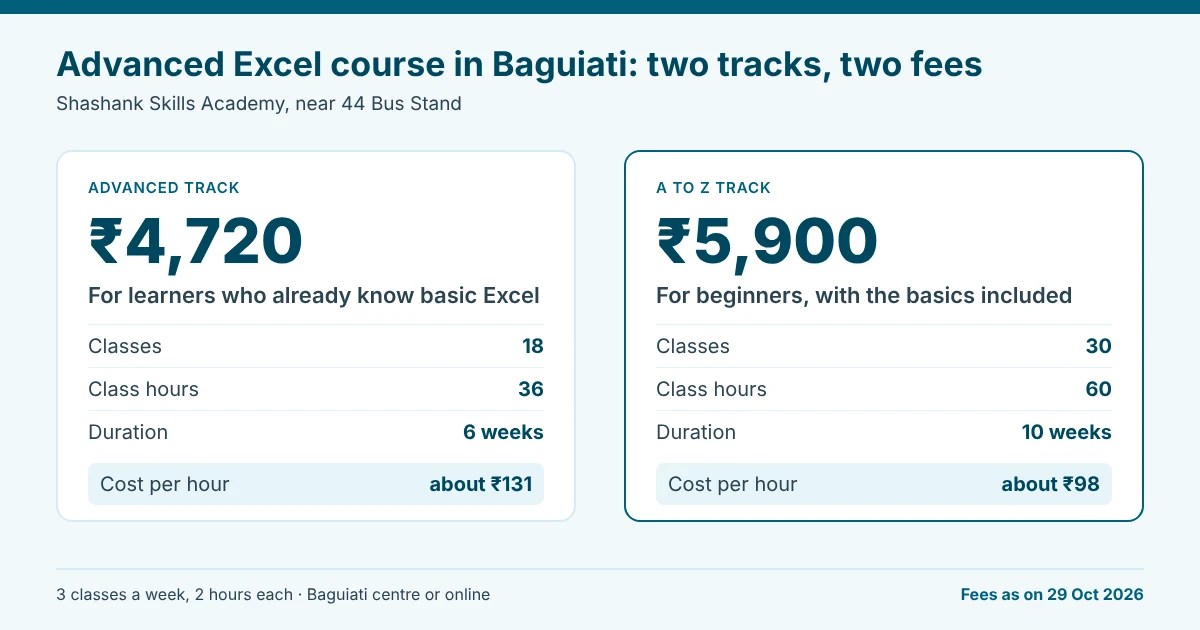
The gap between the tracks is ₹1,180, and the A to Z track spends it on 12 extra classes: nine at the start (the Excel screen, formulas, rows and columns, cell formatting, comments and practice, cell references and sorting, functions, charts, and data query tools), one on advanced macros with VBA code, one on solving practical assignment papers, and a closing quiz and doubt-clearing session.
This makes the A to Z track the cheaper one per class. For a beginner it is also the only track worth taking, because the advanced classes assume you already know the first nine. The ₹5,900 is an all-inclusive fee with no hidden charges.
Which track fits you?
Answer these five questions honestly before you choose a track. If every answer is yes, take the advanced track.
- Do you move around the Excel screen, ribbon and formula bar without hunting for things?
- Do you format cells, set up rows and columns, and sort a table on your own?
- Do you write a SUM or a simple IF formula without copying it from somewhere?
- Do you know the difference between a relative and an absolute cell reference?
- Have you built a basic chart from a table?
A single no is enough to point you to the A to Z track. Its first nine classes cover exactly those gaps, and you reach the advanced material with the foundations in place.
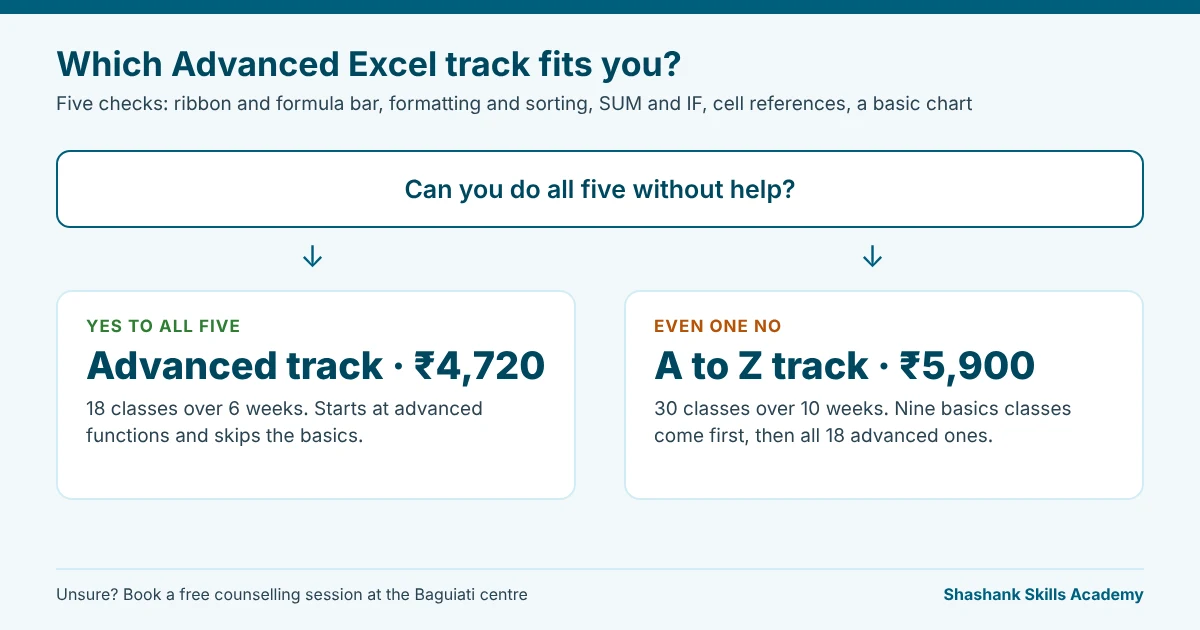
Not sure where you stand? Book a free counselling session before you pay for either track. If you have never used a computer for office work, the Certificate in Computer Applications is a better first step than either Excel track.
The 18 advanced classes, week by week
This is the syllabus of the advanced Excel course in Baguiati at three classes a week. Class numbers in this post follow the advanced track. The A to Z track includes all 18 of these classes after its nine basics classes. The full class list, with the A to Z extras, sits on the Advanced Excel course page.
| Week | Classes | What you work on |
|---|---|---|
| 1 | 1 to 3 | Excel features, cell referencing and named ranges, Paste Special, AutoFill and Transpose. Subtotals, and protection of a cell, sheet, workbook or file. SUMIF, SUMPRODUCT, COUNT functions, IF, AND and OR. |
| 2 | 4 to 6 | CONCAT, TEXTJOIN, MAXIFS, MINIFS, IFS, COUNTIFS and SUMIFS. Numeric functions such as ROUND, MOD and FLOOR. String functions (LEFT, MID, RIGHT, LEN) and logical checks (ISBLANK, ISNUMBER, ISERROR). |
| 3 | 7 to 9 | Database functions (DSUM, DGET and others). LOOKUP, VLOOKUP, HLOOKUP, and INDEX + MATCH. Date and time functions such as DATEDIF, WORKDAY and WEEKDAY. |
| 4 | 10 to 12 | Financial functions (PMT, NPV, IRR) and statistical functions (STDEV, MODE). Goal Seek, Scenario, Solver and Forecast Sheet, plus importing data. Advanced filtering, custom sorting, grouping, data validation and sparklines. |
| 5 | 13 to 15 | Excel Tables, Power Query and the Query Editor, and 3D Maps (formerly Power Map). PivotTables, from the basics to advanced use. Charts, slicers, timelines and dashboards, including donut and progress charts. |
| 6 | 16 to 18 | Macros: recording, reading the code, buttons and add-ins. Excel built-in AI tools and formula writing with ChatGPT. AI-assisted summaries, forecasting, trend analysis and a dashboard. |
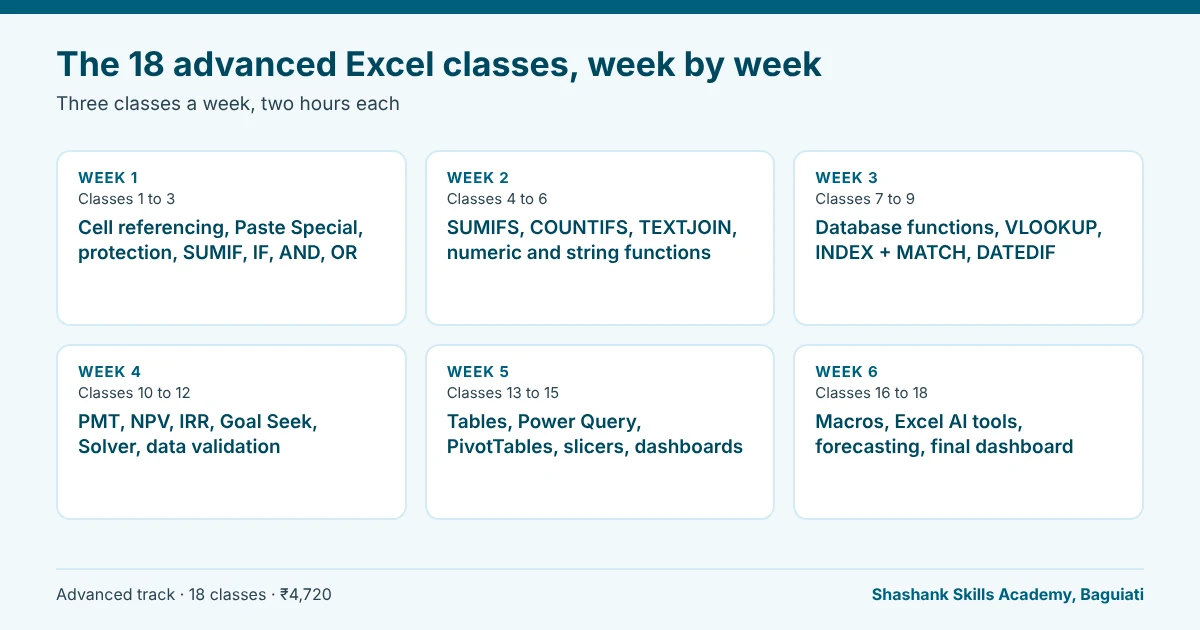
In our view, three classes do the most for everyday office work: the lookup class (VLOOKUP, HLOOKUP and INDEX + MATCH), the PivotTable class and the Power Query class. Microsoft describes PivotTables as a tool to calculate, summarise and analyse worksheet data, and Power Query as a way to import external data, shape it and refresh it when the source changes. Most monthly reports come down to two jobs: cleaning data and summarising it.
Three syllabus formulas on a real sheet
Syllabus lists make every course sound alike, so here are three formulas from the advanced Excel course in Baguiati, shown the way they appear in an office file.
Lookups. Say the Orders sheet holds product codes in column A, and the Prices sheet holds codes in column A and prices in column C. =VLOOKUP(A2,Prices!A:C,3,FALSE) fetches the price. =INDEX(Prices!C:C,MATCH(A2,Prices!A:A,0)) does the same job and keeps working when someone inserts a column in Prices, because it points at the price column itself instead of counting to the third one. Class 8 teaches both, and the second form is the one to prefer in files other people edit.
Conditional totals. =SUMIFS(Sales!D:D,Sales!B:B,"Kolkata",Sales!C:C,"Jan") adds column D only for rows where the city is Kolkata and the month is Jan. A monthly report built on SUMIFS and COUNTIFS updates itself when you paste in new rows. Class 4 covers this family.
Dates. =DATEDIF(B2,TODAY(),"Y") returns the completed years between a date in B2 and today, which is how you turn a joining date into years of service. Class 9 covers DATEDIF along with WORKDAY and WEEKDAY.
Four habits behind broken Excel sheets
Most broken spreadsheets fail for the same few reasons. Four of them come up again and again, and the syllabus has a class for each.
- Merged cells inside a data table. They break sorting, and PivotTables read the empty cells as missing data. Excel Tables in class 13 keep the data in clean rows and columns.
- Typing a number inside a formula, such as
=B2*0.18, instead of pointing at a cell holding the rate. Change the rate once and every typed copy stays wrong. Cell referencing and named ranges in class 1 fix this. - Look-alike text. “Kolkata” and “Kolkata ” with a trailing space fail a lookup. The text functions in week 2, such as LEN and LEFT, help you find the stray character.
- A blank row cuts off the range Excel selects, so a PivotTable misses everything below it, and text mixed with numbers in one column distorts totals. Data validation in class 12 stops bad entries at the source.
Which Excel version does the Power Query class need?
Microsoft’s support page lists Power Query for Excel on Windows, Excel on Mac and Excel for the web. It also says Excel 2016 and 2019 for Mac do not support it. On Windows, Excel 2010 and 2013 needed a separate add-in, which Microsoft has since retired.
If you plan to practise at home, check which Excel version you own against Microsoft’s page before the Power Query week. A Mac with Excel 2016 or 2019 will not run those exercises.
Where and when do the classes run?
The classroom is at H/H-7, Aswininagar, VIP Road, Baguiati, near 44 Bus Stand, Kolkata 700159. Learners who live or work around VIP Road, Kestopur, Lake Town or Bangur Avenue are close to it, and this Google Map shows the exact spot.
The advanced Excel course in Baguiati runs Monday to Saturday between 9 am and 9 pm. You attend three days a week for two hours each. Weekend batches are available for working professionals, and the course is also offered online. Ask about the next batch when you call.
How to compare Excel course fees across Kolkata
The headline price misleads. A course with 16 hours and a course with 60 hours are not selling the same thing.
A Testbook roundup of Excel courses in Kolkata, last updated in 2022, lists fees from ₹6,000 to ₹15,000 and durations from 16 hours to about three months. Those figures are old and belong to other institutes, so use them as context and check each institute’s own page for today’s numbers.
Divide each fee by the total class hours. Measured this way, our course costs about ₹131 an hour on the advanced track and about ₹98 an hour on the A to Z track.
Put the same five questions to every institute you shortlist, including us:
- How many class hours does the fee cover in total?
- Does the fee include everything, or are there separate charges for materials, exams or the certificate?
- Who issues the certificate?
- Is VBA taught, and how deeply?
- Are classes in person, online or both?
Our answers: 36 hours for the advanced track and 60 for the A to Z track. The A to Z fee includes everything, with no hidden charges, and you should ask any institute to confirm the same in writing. Shashank Skills Academy and Tally Institute of Learning issue the certificate jointly. The advanced track introduces macros and the A to Z track adds a class on advanced VBA code. Classes run in person and online.
How to practise between classes
Learners on the advanced Excel course in Baguiati attend three days a week, which leaves four days for practice.
Redo each class exercise on a sheet from your own life or work the same evening: a household budget, a stock list, a month of attendance, a fee register. Real data has the blanks and typos a practice file hides, and fixing them is half the skill. Keep one workbook per week of the syllabus and open the old ones when a new formula needs an old technique.
What the course does not do
Placement is not part of this course. It is a short-term course, so we do not offer or promise a job. You learn the skills and receive the certificate on completion.
It also does not turn you into an analyst in 36 hours. Eighteen classes teach you the tools. Speed comes afterwards, from using them on real sheets at work or on your own data.
The advanced track assumes basic Excel. If you skip the five-question check and fall short on the basics, the pace will feel fast.
Who runs the classes
Shashank Skills Academy has taught in Baguiati since 2001 and sits within the Technosoft Group, which has trained more than 25,000 students over the same years.
We are ISO 9001:2015 certified and an authorised training and assessment partner of Tally Education. The Excel certificate carries the names of Shashank Skills Academy and Tally Institute of Learning, our Tally training arm in Baguiati.
If you are weighing an advanced Excel course in Baguiati against other options, check us before you decide. Visit the centre, talk to a counsellor and read the Google reviews on our business profile. Contact details are on our contact page. When you are ready to ask about a batch, call +91 62922 47501 or send an enquiry through the Advanced Excel course page.